
Sospita SafeGuard
Business Application
- AI-enabled
AI assistance supports users while decisions and approvals remain with people.
Permit to Work and safety observations in one application
Replace paper permits with configurable digital workflows, connect every permit to your hazard and precaution library, and let anyone report observations from the field.


Overview
Sospita SafeGuard is a standalone business application for Permit to Work and observation management, available on the web and as an iOS and Android app in eight languages.
The electronic Permit to Work (e-PTW) replaces paper permits with configurable steps for requesting, validating, issuing and closing work. Each permit draws on your hazard and precaution library, linked to work types, so the relevant risks and controls load automatically. Checklists, attachments and comments can be added at any stage.
Observation Management lets anyone report unsafe conditions and near-misses with a photo. Observations are assigned as to-dos and followed to closure, with every step recorded in a time-stamped timeline.
Every action is time-stamped. Dashboards show activity by site, workflow and author with monthly trends, and an in-app notification list keeps users up to date.
See Sospita SafeGuard in action
Sospita SafeGuard turns paper-based work permits into a digital, audit-ready process, combining guided forms, configurable workflows, integrated checklists and an advisory AI permit review that supports, but never replaces, the people who approve the work.
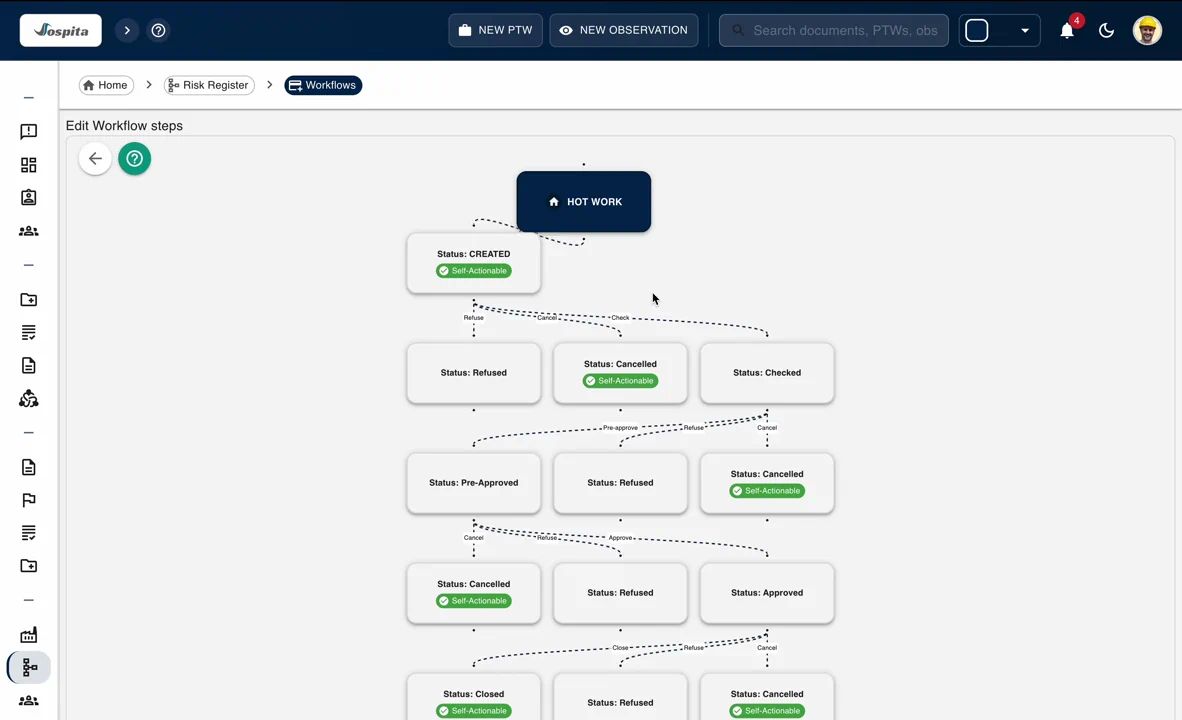
Customizable Workflows
Configure each step, add dynamic inputs of any type, define authorised user groups for that step action.
- Build your own workflow.
- Add dynamic inputs.
- Use visual editor.
Guided Permit Creation
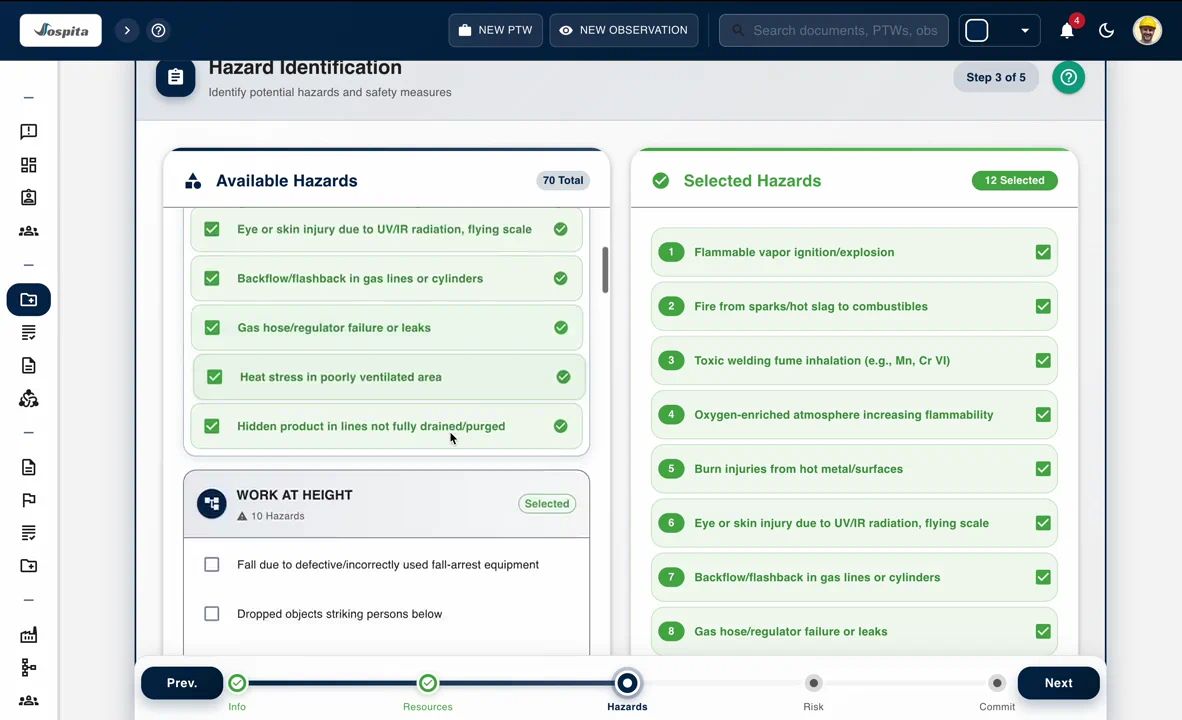
Create permit requests with user-friendly multi step form, attach safety checklists to the permit.
- Multi-step wizard.
- Embedded checklists - create, edit your own.
- Customizable Hazards-Precautions Library.
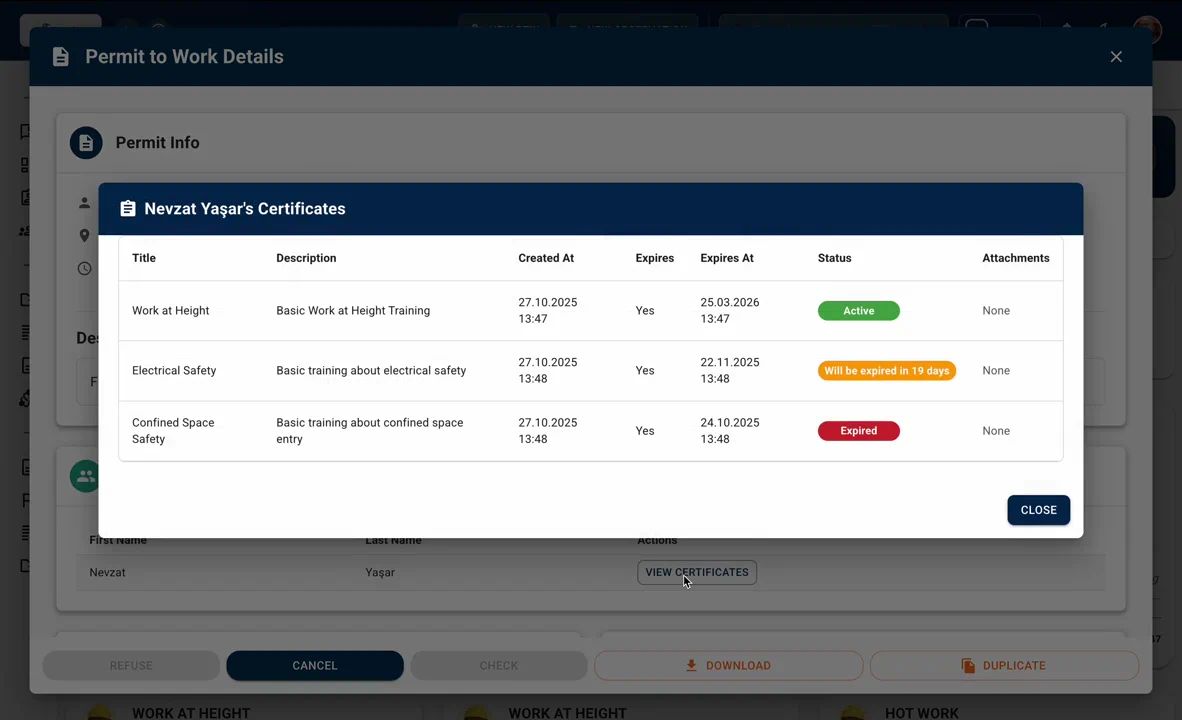
Performer Certificate Visibility
Give approvers visibility of each assigned performer’s certificates and expiry dates before work begins.
- View each performer’s certificate list with issue and expiry details.
- Spot expired or missing certificates without leaving the permit screen.
- Certificate status supports the approver’s competence check; it does not block a permit automatically.
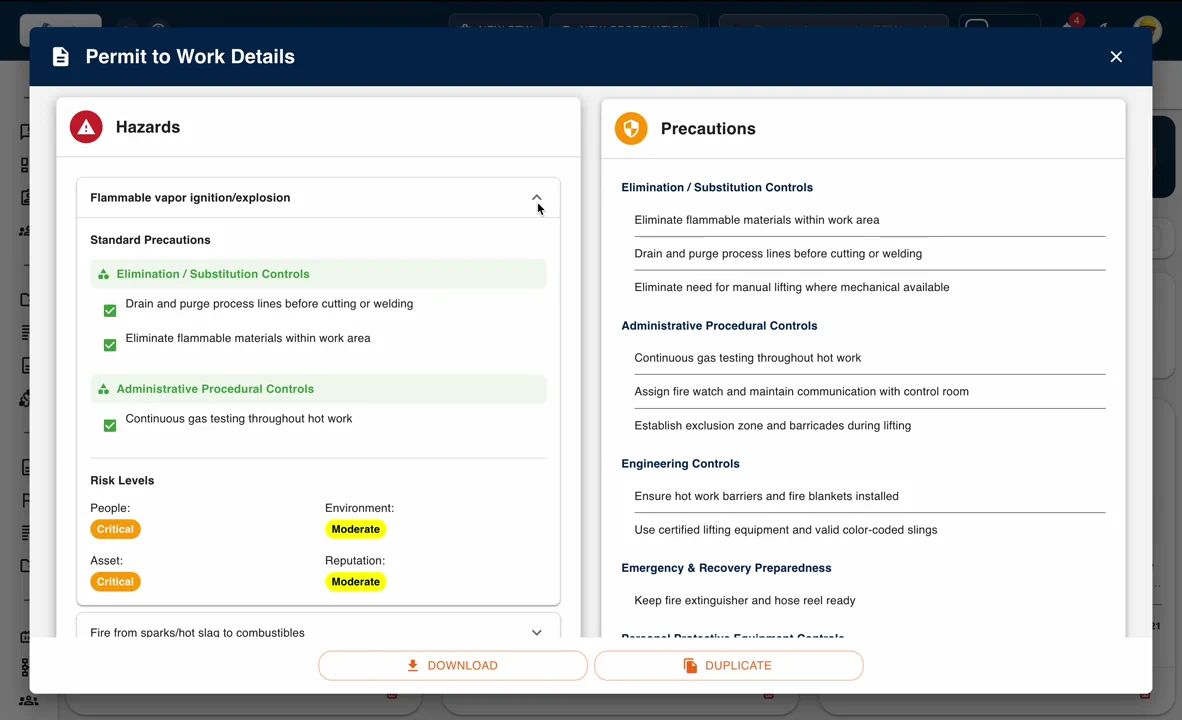
Residual Risk Review in Permit Context
Give approvers and supervisors a clear picture of remaining risks after all controls are applied.
- Expand each hazard to see its residual impact on people, assets, environment, and reputation.
- Confirm that applied precautions effectively reduce risk to acceptable levels.
- Promote informed decision-making with transparent, data-driven risk visibility.
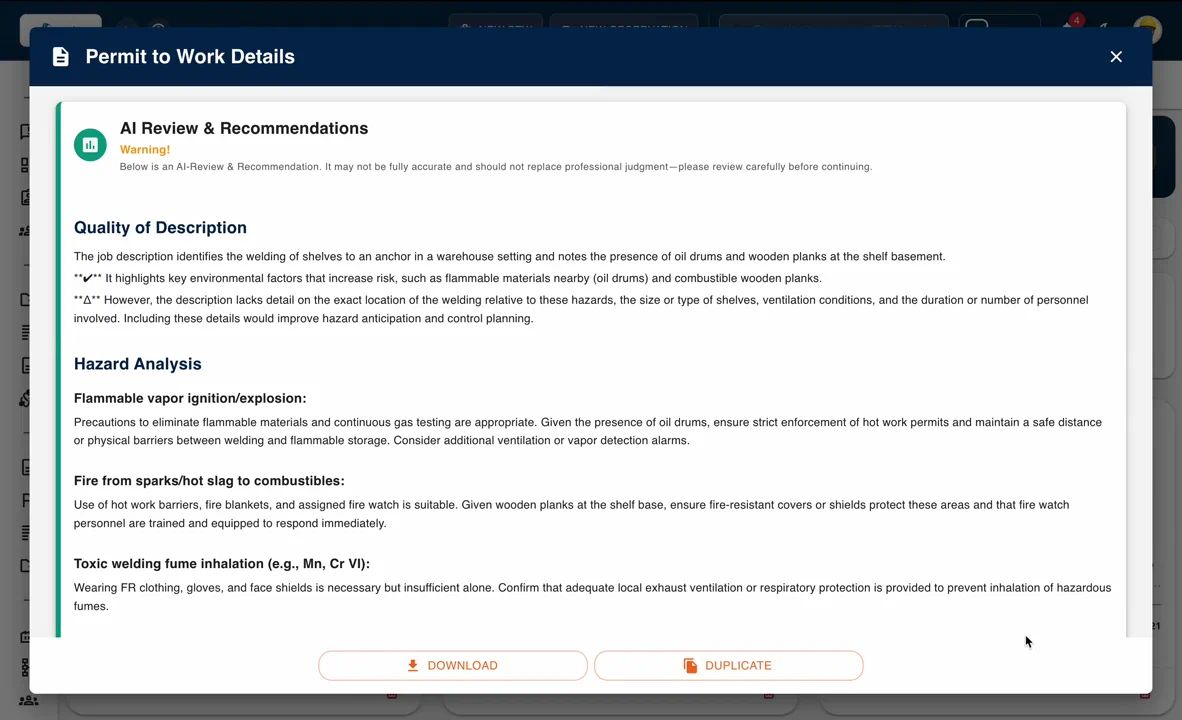
AI-Assisted Permit Review
An AI review of the permit content offers advisory recommendations before approval. It does not approve permits or decide whether work is safe; decisions and approvals remain with people.
- Provides an advisory AI review of the permit before approval.
- Highlights points for the requester and approvers to consider.
- Approval stays with the authorised workflow user groups.
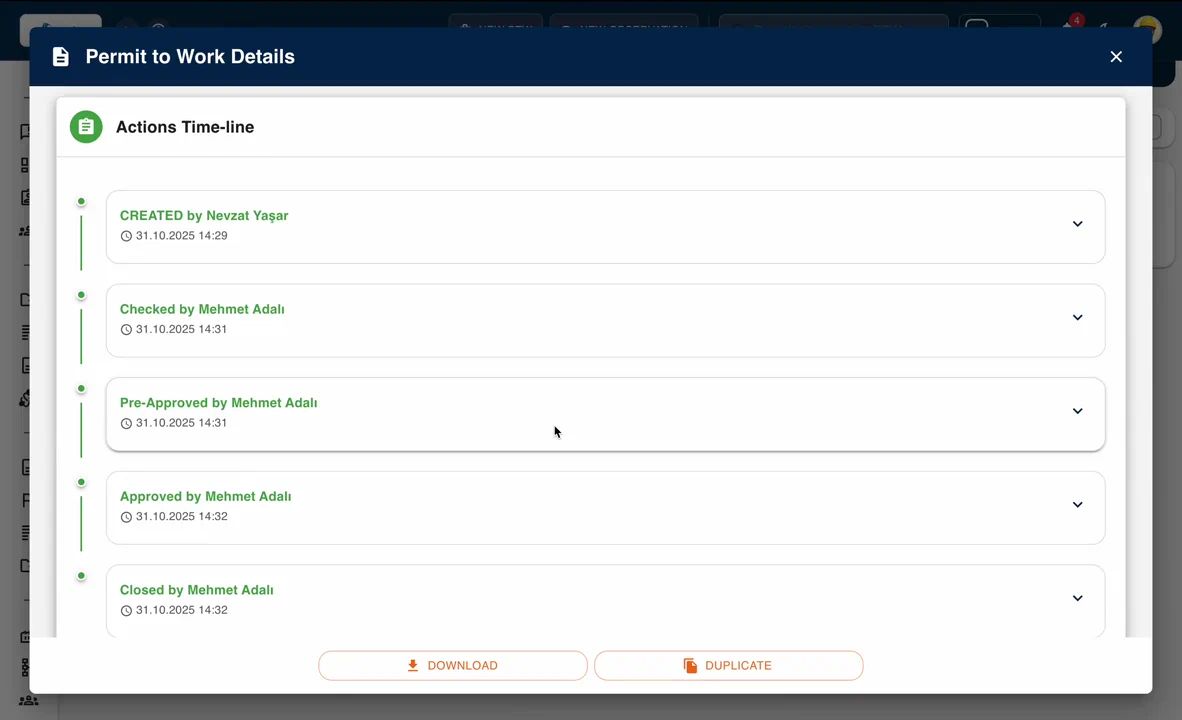
Time stamped actions
See each action - Created, Checked, Approved- time stamped in timeline section with comments at each stage.
- Audit ready.
- In-app notifications.
- Document/comment attachment at any stage.
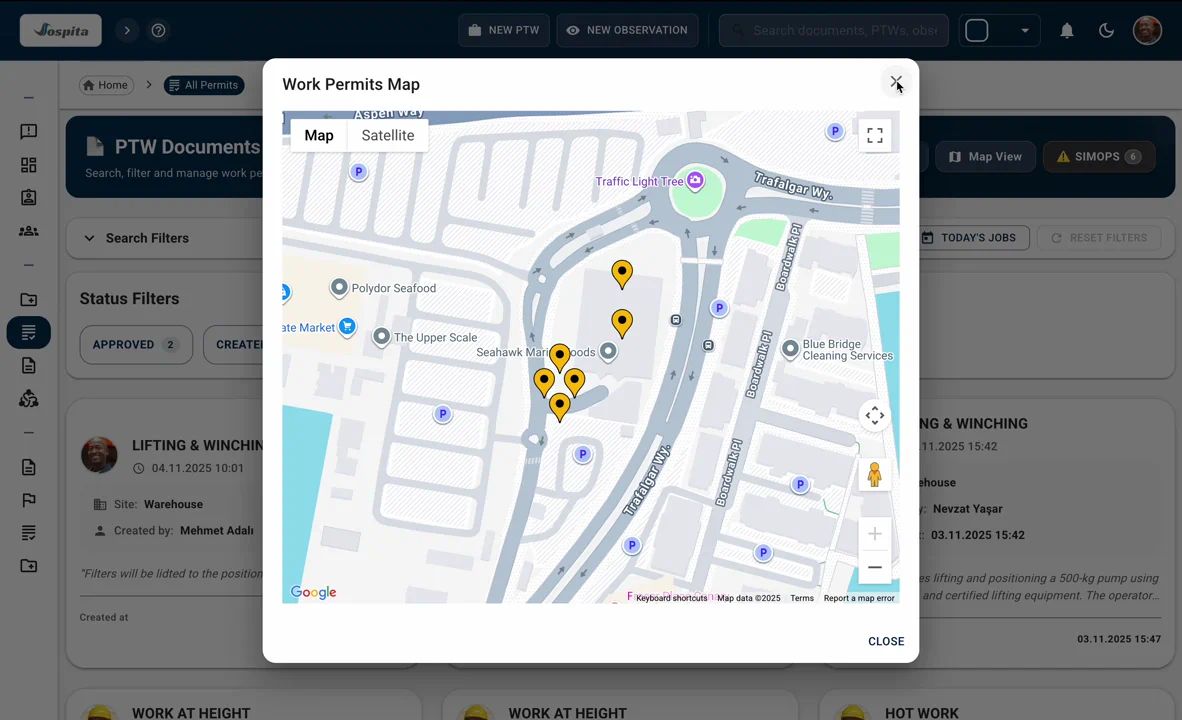
Centralised PTW Management
Centralised PTW management hub enables searching, viewing on map or on calendar for better planning.
- Smart filters & search options.
- Display PTWs on Google Maps.
- Calendar view for planning.
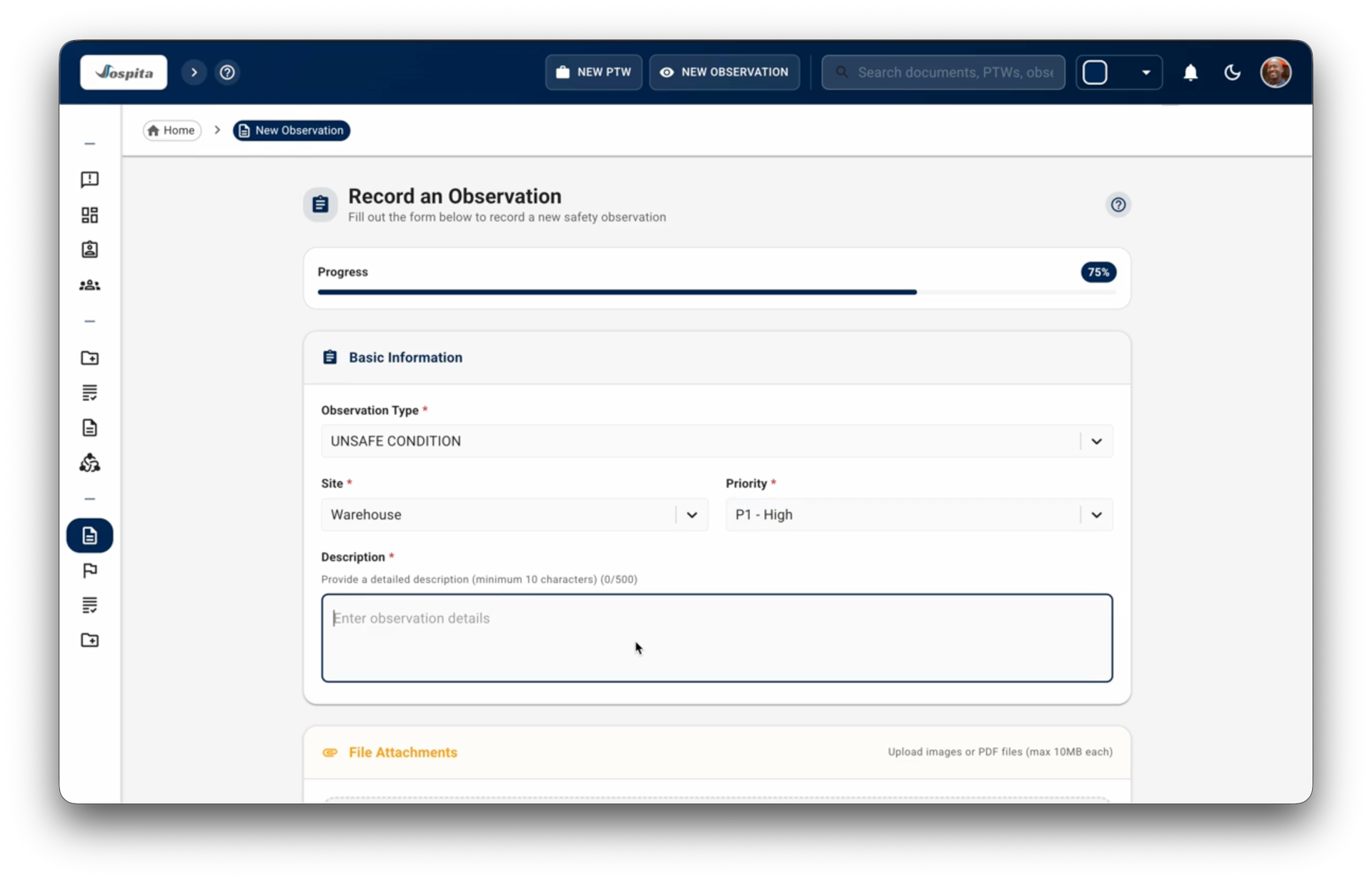
Observation Recording
Capture core details - observation type, site, priority, description and send your report.
- Attache picture if needed.
- Instant report with time stamp.
- Real-time feedbacks on actions.
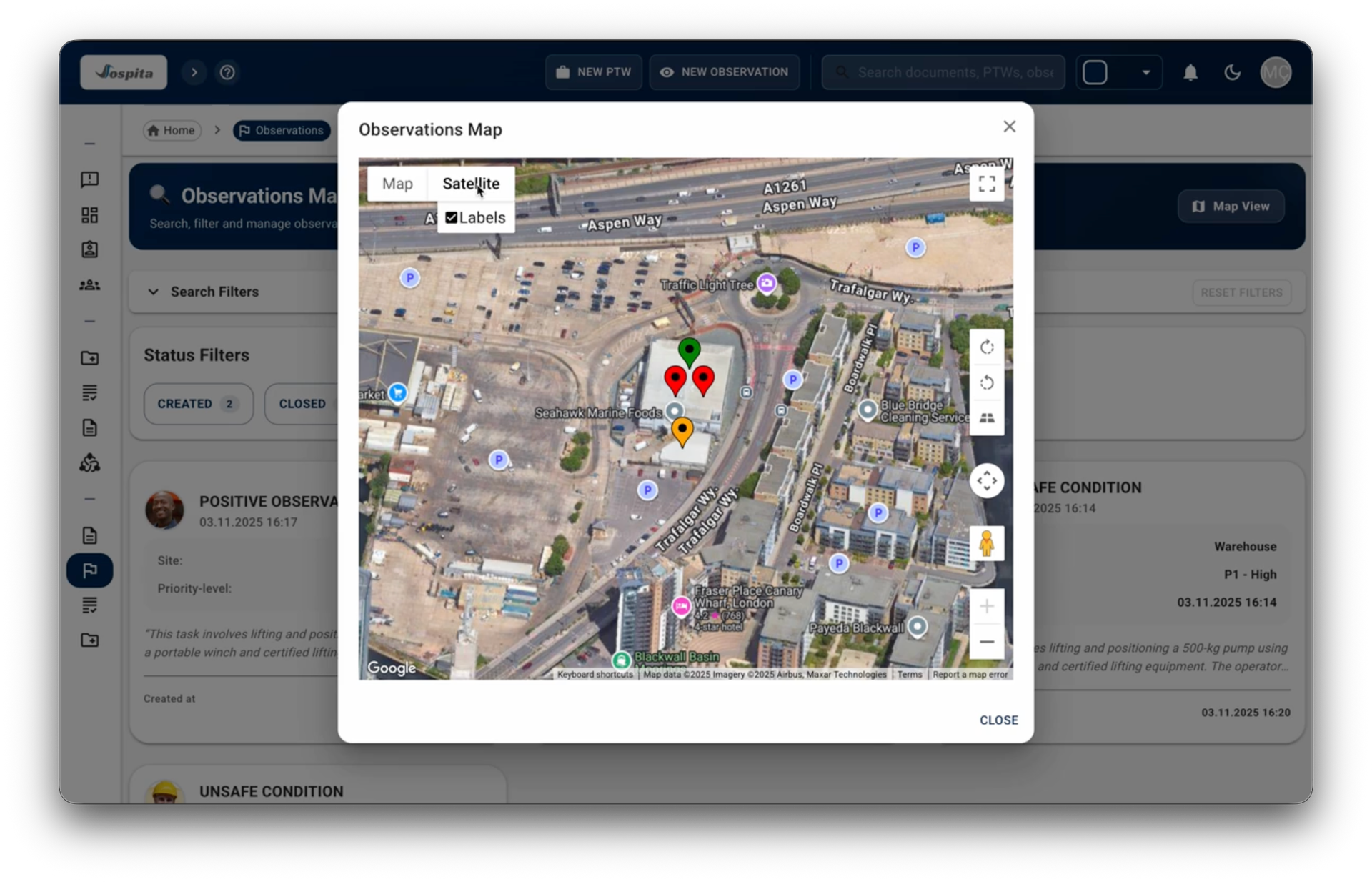
Geo-Mapped Insights
Plot every observation on an interactive Google Map.
- Color-coded by priority level.
- Zoom in on hotspots.
- Click to see details.
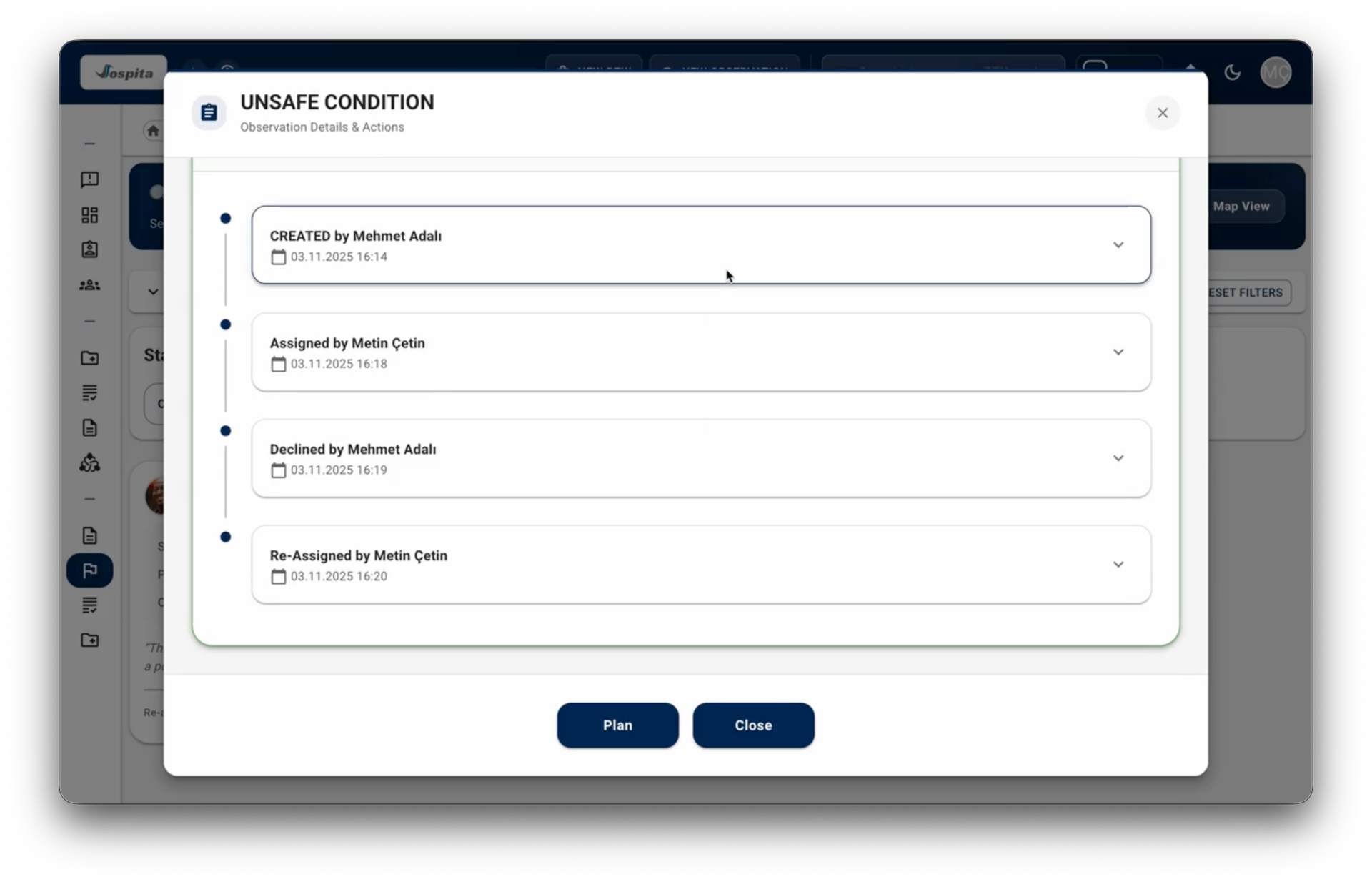
Activity Timeline
Link actions to observations, set due dates, and designate responsible parties.
- See every assignment, update in a clear, chronological activity feed.
- Audit ready documentation.
- Provide real time feedback to the authors.
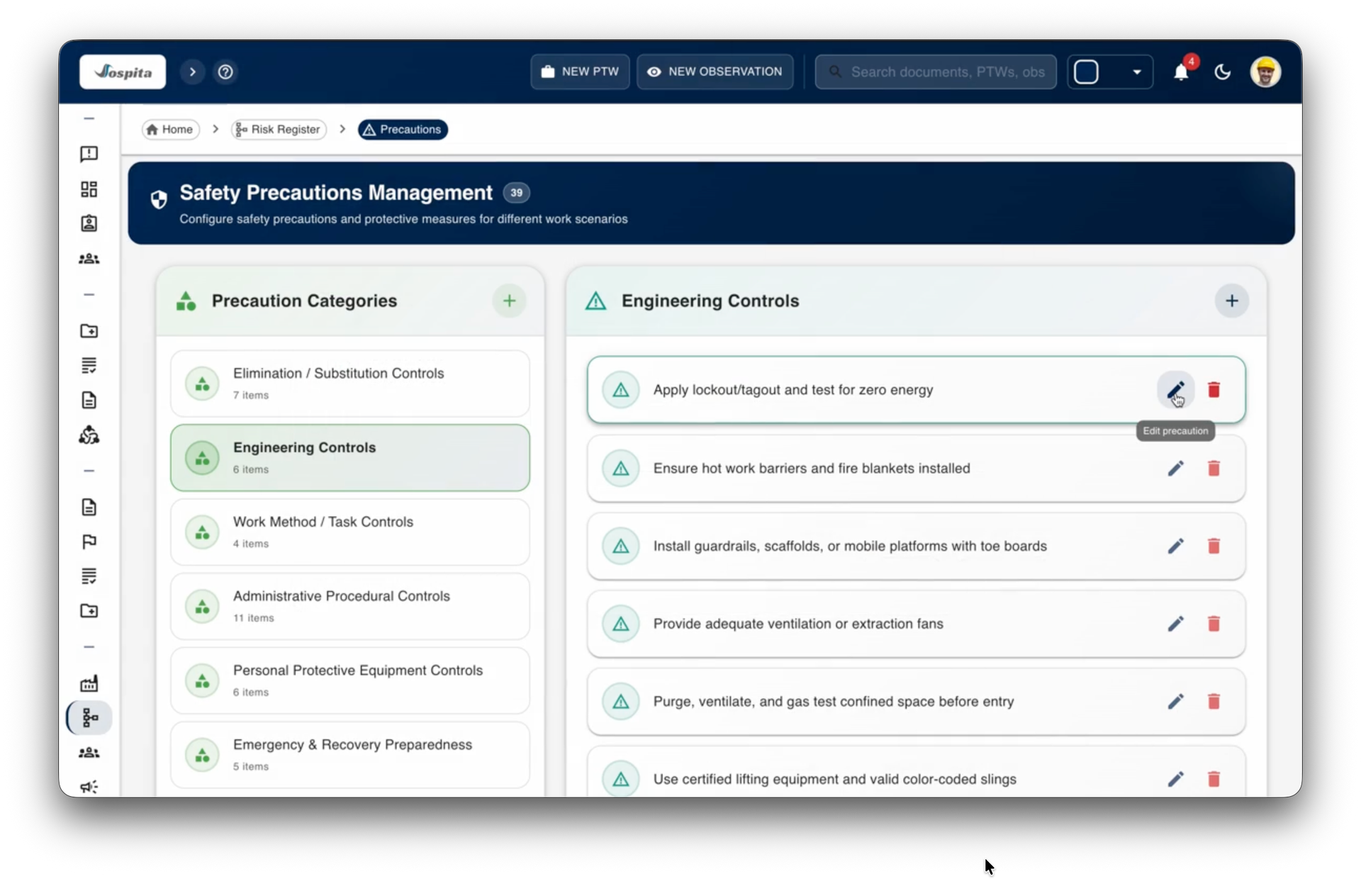
Risk Management
Maintain a structured precaution library that keeps your safety standards consistent and up to date.
- Categorize precautions by control type.
- Edit and update precaution details instantly to match operational needs.
- Ensure all teams access a unified, organization-wide library of safety measures.
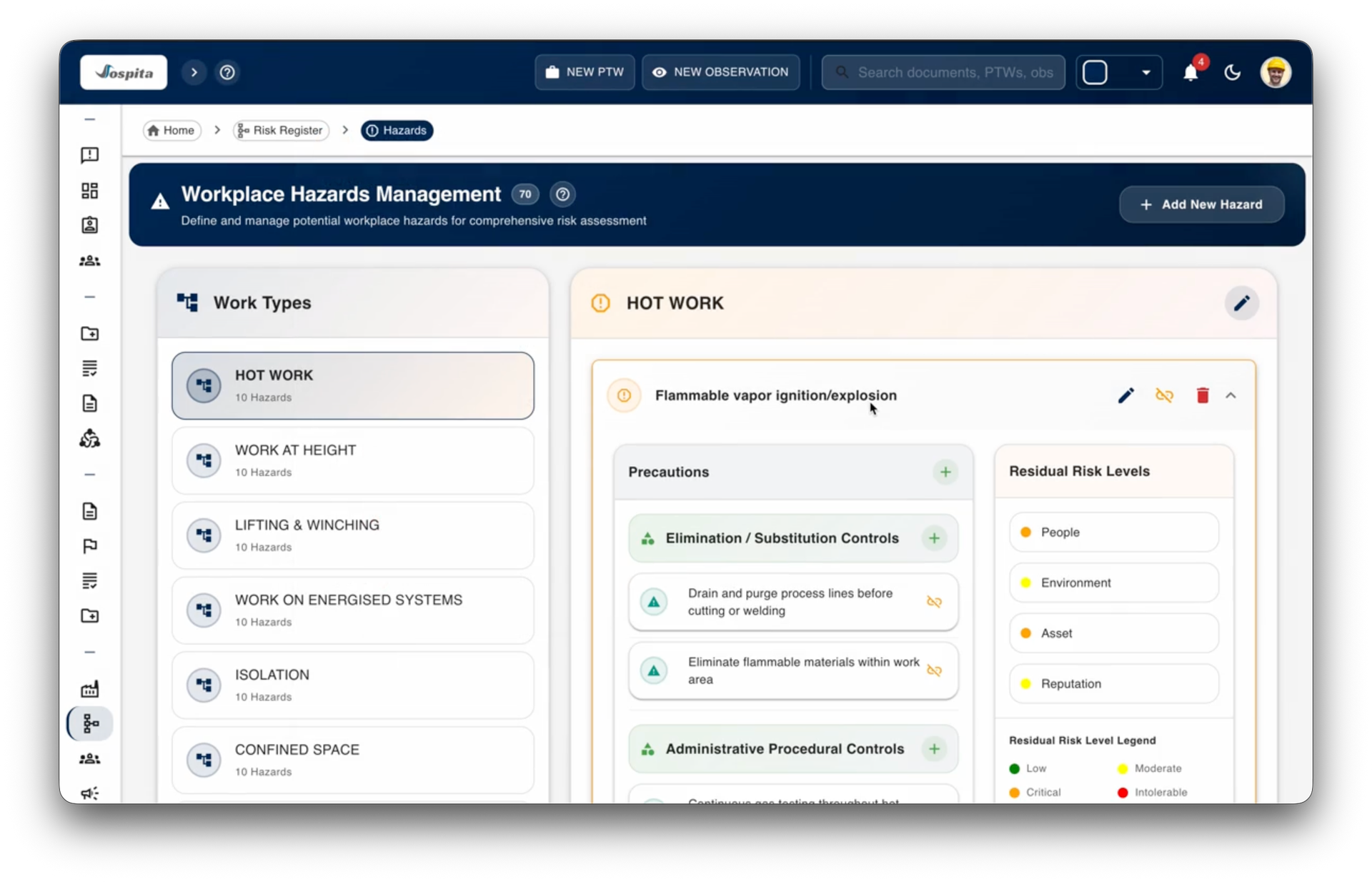
Hazard–Work Type Mapping
Define work types and link each to relevant hazards and control measures for smarter risk visibility.
- Automatically display hazards based on selected work type.
- Assign and adjust likelihood and severity values for each hazard.
- Keep risk assessments accurate and current with real-time hazard updates.
Dynamic PTW Integration
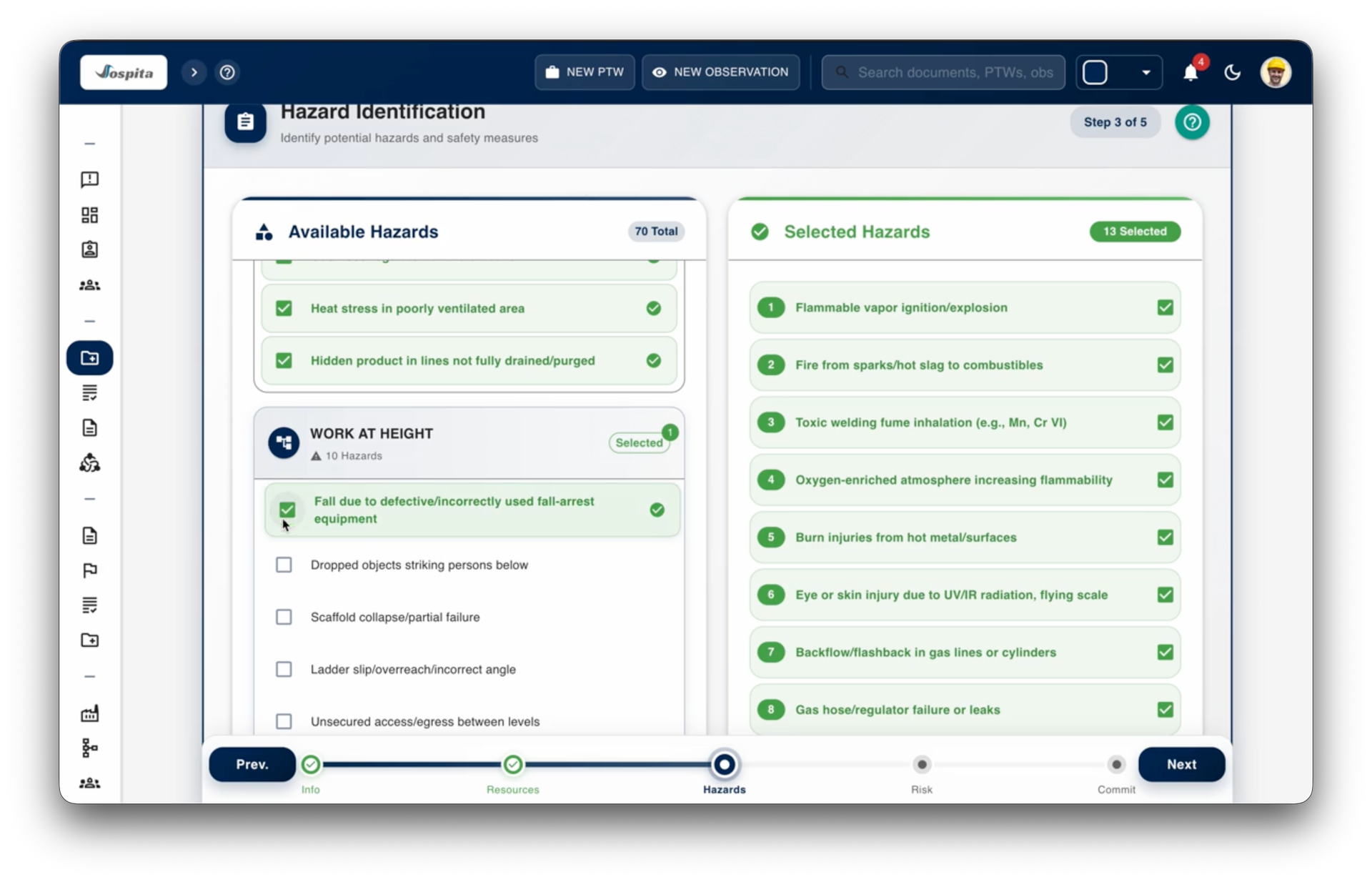
Let every permit automatically include relevant hazards and precautions—no duplication, no oversight.
- Automatically load hazards and controls linked to the permit’s work type.
- Add additional hazards (e.g., Work at Height risks) during permit preparation.
- Verify precautions step by step during permit authorization for full compliance.


Key capabilities
Configurable workflows
Define each step, its inputs and the user groups allowed to act, using a visual workflow editor.
Guided permit creation
A multi-step permit form with embedded safety checklists and a customisable hazards and precautions library.
Hazard and work type mapping
Link work types to hazards and controls so the relevant risks load into each permit automatically.
Residual risk review
Approvers see each hazard's remaining risk to people, assets, environment and reputation after controls are applied.
Performer certificate visibility
See each assigned performer's certificates with issue and expiry dates, and spot expired or missing ones from the permit screen.
AI-assisted permit review
An advisory AI review of permit content before approval. It supports, but does not replace, the professional judgement of the people who approve the work.
Observation reporting
Report the observation type, site, priority and description with an optional photo. Observations are assigned as to-dos and every step is recorded in a time-stamped timeline.
Map, calendar and timeline
Find permits and observations on a map, plan work on a calendar and follow every action in a time-stamped timeline.
Dashboards and in-app notifications
Dashboards show activity by site, workflow and author with monthly trends, and an in-app notification list keeps users up to date.
Printed permit scanning
Scan a printed work permit to open its digital version, or duplicate an existing permit to save time.
Eight languages
Use SafeGuard on web and mobile in English, Turkish, French, German, Dutch, Spanish, Italian and Portuguese, with role-based actions for teams across sites.
Platforms & industries
Platforms
Industries
Pricing
Basic
€200 per month
Includes
- e-PTW
- Observations Management
- E-mail support
- Up to 20 users
- 1,000 e-PTWs
- 1,000 Observations
Premium
€750 per month
Includes
- e-PTW
- Observations Management
- Up to 100 users
- 10,000 e-PTWs
- 20,000 Observations
- Standard branding
- Phone and e-mail support during business hours
Enterprise
Contact us
Includes
- e-PTW
- Observations Management
- Priority support
- Advanced branding
- Unlimited users
- Custom onboarding and training
- Advanced compliance tools (subject to potential added cost)
- Optional SAML SSO integration (may require separate setup fee)
Payments processed by iyzico